

HIGHLIGHTS OF CHRONOS 6.0.0
Java 17 as a prerequisite
With version 6.0.0, Java 17 is required as Java for the CHRONOS Server, AdminSuite FX and Archive Explorer. However, the CHRONOS JDBC driver can still be accessed with Java 8.
Process monitoring of the CHRONOS Server (subject to license )
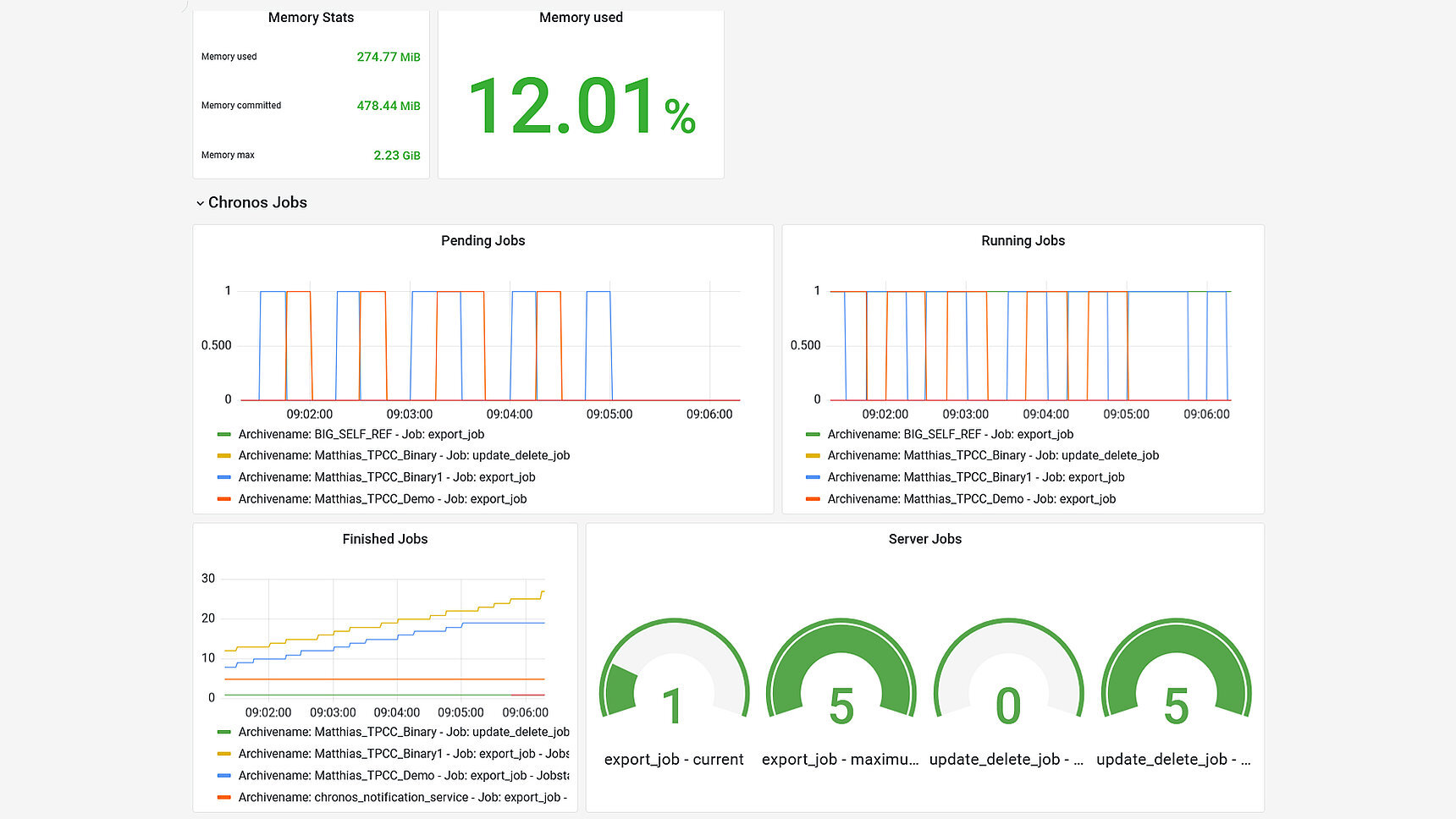
It is now possible to check the CHRONOS processes via external dashboards.
Server & job status (running, successful, faulty jobs) and system load can be viewed.
Azure Monitor, Elastic, Prometheus and others are supported.
A possible display with Grafana could look like this:
Mark & delete job flags & error analysis optimized
Mark/delete job flags can now be set per M/L configuration, whether the flag should be set or left blank in the event of a database error.
If the flags are left blank, the tag can be checked again the next time an M/L job is started.
In addition, the detailed tagging & deletion job logs have been extended for even better error analysis.
Search Performance Tester
The Search Performance Tester offers the option of executing self-configured search queries at specific times in order to automatically check whether there is a decrease or increase in performance.
If there is a decrease in performance, an e-mail is sent to the user.
The executed searches, job ID 318704 is above the tolerance limit and therefore not OK.


Index Checker Job
The Index Checker job automatically retrieves missing binary search indexes. The job has been designed to use CPU resources sparingly. The Index Checker job must be activated explicitly for each archive configuration.
CyberArk as password provider (license required)
CHRONOS now supports the CyberArk interface "Central Credential Provider Web Service", which - if authorized - transmits the current passwords to CHRONOS. This means that it is no longer necessary to manually save or change database passwords in CHRONOS.
CHRONOS SQL updates automated
CHRONOS now updates its repository database automatically from version 6.0.0.
It is no longer necessary to import manual update scripts when updating a version.
Database metadata loading optimized
The logic for loading the metadata of the archiving databases has been revised, which has increased the loading speed.
OUTLOOK Plans 2023/2024
- The user management system included in CHRONOS now requires a separate installation.
- This separation enables improved integration into customer systems that use Open ID Connect technology, especially for the "Single Sign On" function.
- It also enables independent developments that are no longer dependent on CHRONOS.
- When using several CSP products, all products can be operated via a central user management system in future.
- CHRONOS is breaking new ground and supports general document archiving in addition to a classic archiving system for relational databases and flat files.
- Instead of databases, message queues (MQ) or a file system serve as data sources for the data to be archived.
- The complete "raw data" that is available in the MQ is saved to enable an efficient search regardless of the file name.
- Parameters to be indexed can be defined for "readable" files such as JSON/XML.
- We also intend to index metadata from "unreadable" documents such as PDFs or MS Office files.
- Text recognition (OCR) is also provided with an index for scanned documents such as PDFs or image files to enable a keyword search here too.
Of course, the "classic" CHRONOS will continue to be equipped with features and bug fixes.